Free Gift Exchange Generator
Gift Exchange Generator
Draw names online for any gift exchange, whether family, friends, teams or clubs. Set the rules, send everyone a personal link, and everyone can add a wishlist. No email address needed to take part.
How the Name Drawing Works
- 1
Add everyone
Type names or paste a list. An organizer who is only running the exchange can be left out of the draw.
- 2
Set the rules
Mark who should not draw whom, such as partners, housemates, or whoever swapped last year, and the draw works around it.
- 3
Everyone draws
Each person opens their own link and draws from the virtual hat, at any time and on their own device.
- 4
Add wishlists
After drawing, everyone can list what they would like, with photos, so the person who drew them knows what they would like.
- 5
Or answer four questions
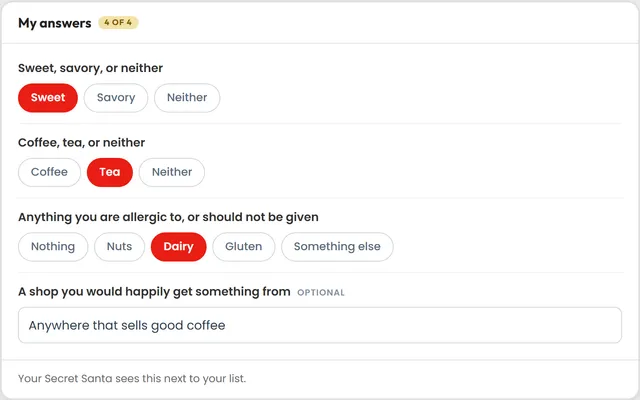
Sweet or savory, coffee or tea, anything to avoid, and a shop they like. Three are a single tap and one is a line of text, for people who do not write a list.
Common Gift Exchange Problems
Each of these common problems has a feature that handles it.
Someone draws their own name
The generator never assigns anyone to themselves, and it reports before anyone draws if your rules leave no valid solution.
Two people who should not match are matched
Mark a pair with a conflict rule and the draw routes around them automatically, however many pairs you add.
No one knows what to buy
Wishlists. Everyone can add items with photos, or share a product page straight from a shopping app into their own list.
Some people never fill in a wishlist
An exchange can ask four short questions instead, and three of them are a single tap. Whoever drew that person reads the answers in place of the list.
People forget to draw
Send everyone their link by email at no cost, and resend later without typing the address again.
Themes for Any Occasion
Themes suit exchanges throughout the year: Confetti for birthdays and parties, Black Tie for the office, Snowfall for winter. The theme shows on the draw, the group pages, the invite, the emails and the link preview. Themes are a paid upgrade.
'%20fill='%233EC6E0'%20stroke='%23000'%20stroke-width='6'/%3e%3crect%20x='396'%20y='45'%20width='24'%20height='14'%20rx='3'%20transform='rotate(-22%20408%2052)'%20fill='%23FFD23F'%20stroke='%23000'%20stroke-width='6'/%3e%3crect%20x='412'%20y='203'%20width='24'%20height='14'%20rx='3'%20transform='rotate(30%20424%20210)'%20fill='%23FF4F9A'%20stroke='%23000'%20stroke-width='6'/%3e%3crect%20x='28'%20y='229'%20width='24'%20height='14'%20rx='3'%20transform='rotate(-30%2040%20236)'%20fill='%23FFD23F'%20stroke='%23000'%20stroke-width='6'/%3e%3crect%20x='80'%20y='353'%20width='24'%20height='14'%20rx='3'%20transform='rotate(20%2092%20360)'%20fill='%233EC6E0'%20stroke='%23000'%20stroke-width='6'/%3e%3crect%20x='360'%20y='353'%20width='24'%20height='14'%20rx='3'%20transform='rotate(-14%20372%20360)'%20fill='%237CC36A'%20stroke='%23000'%20stroke-width='6'/%3e%3cg%20id='outline'%20fill='%23000'%20stroke='%23000'%20stroke-width='32'%20stroke-linejoin='round'%3e%3ccircle%20cx='230'%20cy='384'%20r='28'/%3e%3cpath%20d='M86%20124%20L374%20124%20L244%20386%20C238%20398%20222%20398%20216%20386%20Z'/%3e%3cellipse%20cx='230'%20cy='120'%20rx='168'%20ry='50'/%3e%3c/g%3e%3ccircle%20cx='230'%20cy='384'%20r='28'%20fill='%23FFD23F'/%3e%3cpath%20d='M86%20124%20L374%20124%20L244%20386%20C238%20398%20222%20398%20216%20386%20Z'%20fill='%23FF4F9A'/%3e%3cg%20fill='%23FFD23F'%3e%3ccircle%20cx='150'%20cy='196'%20r='15'/%3e%3ccircle%20cx='258'%20cy='210'%20r='15'/%3e%3ccircle%20cx='206'%20cy='282'%20r='14'/%3e%3ccircle%20cx='312'%20cy='176'%20r='13'/%3e%3c/g%3e%3cg%20fill='%233EC6E0'%3e%3ccircle%20cx='198'%20cy='176'%20r='12'/%3e%3ccircle%20cx='296'%20cy='236'%20r='12'/%3e%3ccircle%20cx='238'%20cy='330'%20r='11'/%3e%3ccircle%20cx='168'%20cy='246'%20r='11'/%3e%3c/g%3e%3cpath%20d='M328%20214%20C312%20254%20292%20294%20268%20334'%20fill='none'%20stroke='%23FFF'%20stroke-width='15'%20stroke-linecap='round'/%3e%3cg%20id='opening'%3e%3cellipse%20cx='230'%20cy='120'%20rx='168'%20ry='50'%20fill='%23000'/%3e%3cellipse%20cx='230'%20cy='118'%20rx='150'%20ry='34'%20fill='%23FFF'/%3e%3c/g%3e%3c/svg%3e) ConfettiPurple, with a party hat
ConfettiPurple, with a party hat Black TieNavy and gold, with a top hat
 SnowfallWinter blue, with a knit beanie
Gift Exchange Questions
Yes. You can share one link instead of entering everyone yourself, and each person adds their own name and email address. You set how many can join and when the link closes, and you draw names when you are ready.
No. No one needs an account, a password or an email address to take part. Each person gets their own link and needs nothing else. An account is available free if someone wants their groups kept in one place.
There is no limit. Groups run on Secret Santa Hat have gone past 280 people, and small groups of three or four work exactly the same way.
Yes. Birthdays, Galentines Day, a New Year exchange, an office party and a family gathering are all event types you can pick, and the generator works the same way for any occasion.
An exchange can ask four short questions instead: sweet or savory, coffee or tea, anything to avoid, and a shop they like. Three are a single tap, and whoever drew that person reads the answers next to the list. A wishlist is still there for anyone who wants one.
Add or remove them and reset the draw. If a change leaves the draw broken, the organizer gets a banner explaining exactly what is wrong along with a one-click reset.